Streamlining Fashion Illustration with Procreate Fabric Texture Brushes Vol. 7
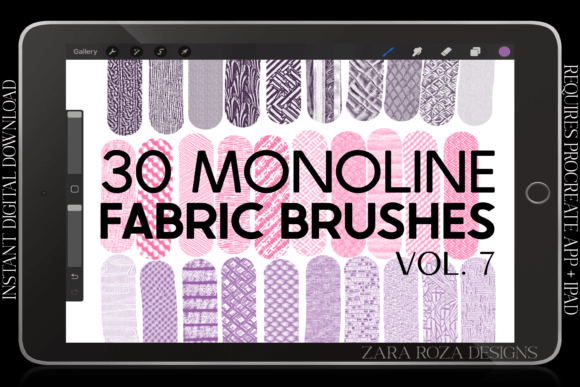
Digital fashion illustration sits at a complex intersection of technical precision and artistic expression. For artists working on the iPad, the challenge often lies not in drawing the figure, but in efficiently rendering the diverse materials that clothe them. Rendering the weave of a wool sweater, the crisp fold of a cotton shirt, or the fluid drape of silk can be time-consuming when done manually from scratch. This is where specialized tools like Procreate Fabric Texture Brushes Vol. 7 enter the workflow, offering a targeted solution for character artists, fashion designers, and hobbyists alike.
This specific brush pack distinguishes itself by focusing on monoline aesthetics and consistent opacity, a departure from the pressure-sensitive, painterly brushes that dominate many general-purpose digital art libraries. Understanding whether this tool aligns with your creative process requires a close look at its unique constraints and capabilities compared to broader texture solutions.
The Distinctive Approach of Monoline Consistency
The defining feature of Procreate Fabric Texture Brushes Vol. 7 is its strict adherence to a one-width, no-pressure-sensitivity model. In traditional digital painting, artists often rely on pressure sensitivity to vary line weight and opacity, mimicking the organic variation of ink or paint. However, this variability can sometimes work against the clean, graphic look required in modern character design, manga, and flat-style fashion illustrations.
These thirty brushes are engineered to provide crisp edges and even textures with the same level of opacity throughout the stroke. This consistency is particularly valuable for creating patterns such as stripes, checks, or knitted textures where uniformity is key to realism. When drawing a striped shirt, for example, a pressure-sensitive brush might inadvertently taper or fade, breaking the illusion of a woven fabric. The monoline approach ensures that every stripe remains bold and legible, maintaining the structural integrity of the design.
This method also simplifies the learning curve for beginners. Without the need to master pressure control for texture application, artists can focus entirely on placement and composition. It allows for a more predictable outcome, which is crucial when working under tight deadlines or when iterating through multiple outfit designs for a single character.
Comparing Specialized Textures to General-Purpose Tools
When evaluating Procreate Fabric Texture Brushes Vol. 7, it is helpful to compare it against two common alternatives: standard hard-round brushes with manual texture overlays, and highly detailed, painterly texture brushes.
Manual Texturing vs. Pre-made Stamps
Many artists start by using a basic round brush and manually painting in shadows and highlights to suggest fabric. While this offers maximum control, it is incredibly labor-intensive. Alternatively, some use photo overlays of real fabrics. While realistic, photo overlays can look disjointed if not blended perfectly and often lack the stylized appeal needed for anime, chibi, or comic art. The brushes in Vol. 7 offer a middle ground: they provide the speed of a stamp but retain the hand-drawn aesthetic necessary for cohesive character art.
Painterly Brushes vs. Monoline Precision
High-end painterly brushes simulate the bleed of watercolor or the grain of charcoal. These are excellent for atmospheric concept art but can become muddy when used for precise garment details. If you are drawing a intricate lace collar or a structured jacket, a soft, blending brush may obscure the fine details. The crisp edge of the Vol. 7 brushes ensures that small details, such as the stitching on a belt or the pattern on a scarf, remain sharp and readable, even at smaller scales.
Versatility Across Character Art Styles
The utility of this brush set extends beyond high-fashion illustration. Its design accommodates a wide range of popular digital art styles, including:
- Anime and Manga: These styles often rely on clean lines and flat colors. The monoline texture brushes integrate seamlessly into cell-shaded workflows, adding depth to clothing without disrupting the clean aesthetic.
- Chibi and Cartoon: Simplified characters benefit from bold, readable textures. A simple striped pattern on a chibi character’s shirt can convey personality quickly without overwhelming the small canvas space.
- Comic and Fan Art: Consistency is vital in sequential art. Using these brushes ensures that a character’s outfit looks the same in panel one as it does in panel ten, reducing visual confusion for the reader.
The pack includes variations for plain fabrics, stripes, and ruffles, covering the foundational elements of most wardrobes. Whether you are illustrating a cozy sweater, a formal dress, or casual accessories like hats and socks, the textures provide a reliable base that can be further customized with color and shading.
Practical Limitations and Decision Factors
While Procreate Fabric Texture Brushes Vol. 7 offers significant advantages for specific workflows, it is not a universal solution. Recognizing its limitations is essential for making an informed purchase decision.
Lack of Pressure Sensitivity
For artists who prioritize organic, expressive line work, the absence of pressure sensitivity may feel restrictive. If your style relies on dynamic line weight variation to convey movement or emotion, these brushes may feel too rigid. They are tools for construction and detailing, not for expressive sketching.
Stylized vs. Photorealistic
These brushes are designed for illustrative purposes. They will not produce photorealistic fabric renders suitable for architectural visualization or hyper-realistic portraiture. If your goal is to mimic a photograph exactly, you may need more complex, multi-layered brush sets or 3D modeling tools instead.
Platform Dependency
It is crucial to note that this is a digital file compatible exclusively with the Procreate app on iPad and iPad Pro. It requires no physical shipping, which is convenient for instant access, but it locks you into the Apple ecosystem. Artists using Photoshop, Clip Studio Paint, or Android-based tablets will not be able to utilize this specific .brushset file.
When to Choose This Brush Pack
You should consider integrating Procreate Fabric Texture Brushes Vol. 7 into your library if:
- You value efficiency: You want to reduce the time spent manually painting repetitive patterns like knits or stripes.
- You work in a graphic or semi-realistic style: Your art benefits from clean, crisp edges rather than soft, blended textures.
- You create character-focused art: Your primary subject is people, and their clothing is a key element of their design and storytelling.
- You seek consistency: You need a reliable way to maintain uniform texture quality across multiple illustrations or comic panels.
Conversely, you might look for alternative resources if you primarily create abstract art, landscape paintings, or hyper-realistic studies where organic variation and pressure sensitivity are paramount.
Integrating Textures into Your Workflow
To get the most out of these thirty brushes, consider using them on separate layers. This non-destructive approach allows you to adjust the opacity, blend mode, or color of the texture independently from the base garment color. For instance, you can draw a white shirt on one layer, then apply a subtle stripe texture on a layer above, setting it to "Multiply" to let the shadows of the shirt show through. This technique preserves the form of the clothing while adding the desired pattern detail.
Additionally, because the brushes have crisp edges, they respond well to transformation tools. You can stretch or rotate a textured stroke to fit the perspective of a folded sleeve or a draped skirt without losing significant quality, provided the resolution is managed correctly.
In conclusion, Procreate Fabric Texture Brushes Vol. 7 serves as a specialized instrument in the digital artist’s toolkit. It trades the organic unpredictability of pressure-sensitive brushes for the reliability and speed of monoline consistency. For fashion illustrators, character designers, and comic artists working in Procreate, this tradeoff often results in a cleaner, more professional finish with less effort. By understanding its specific strengths and limitations, you can determine if this focused approach aligns with your artistic goals and workflow preferences.