Seamless Paper Texture Brushes: Bringing Analog Warmth to Digital Art
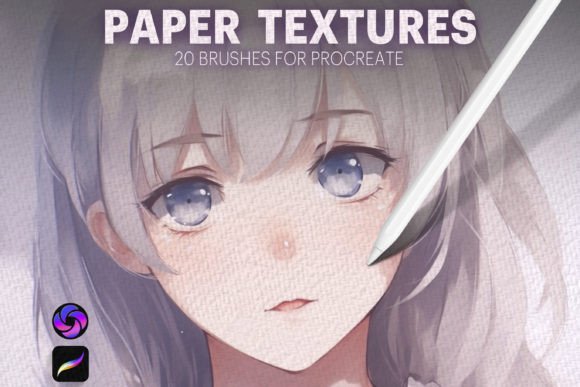
Digital art has come a long way, but there is still one hurdle that many creators face: the sterile perfection of the screen. No matter how skilled you are with an Apple Pencil, your work can sometimes feel too clean, too flat, or distinctly "digital." This is where Seamless Paper Texture Brushes change the game. By introducing organic imperfections directly into your workflow, you bridge the gap between traditional media and modern technology. The newly released collection, Seamless Paper Texture Brushes 2.0 for Procreate, is designed specifically to solve this problem, offering artists and designers a toolkit to add immediate realism and depth to their projects.
This isn't just about slapping a filter over a finished piece. It is about integrating texture into the creative process from the start. With twenty high-quality brushes in this set, you gain the ability to mimic everything from coarse watercolor paper to smooth, premium cardstock. For professionals who need their digital portfolios to stand out, or hobbyists who miss the tactile feel of sketching, these tools provide an authentic look that sets work apart in a saturated market.
Why Texture Matters in a Digital World
When we look at physical art, our eyes register more than just color and shape. We notice the grain of the paper, the way ink bleeds slightly into fibers, and the subtle variations in surface roughness. These micro-details create emotional resonance. A digital illustration without texture can feel cold or corporate. Adding a paper grain makes the image feel handcrafted, approachable, and human.
Using Seamless Paper Texture Brushes allows you to retain the convenience of digital editing—undo buttons, layers, and infinite colors—while achieving the aesthetic warmth of analog media. The "seamless" aspect is crucial here. Unlike static overlays that can look repetitive or tiled, these brushes are crafted to blend naturally with your strokes. Whether you are creating a rough, expressive sketch or a polished commercial design, the texture adapts to your intent rather than fighting against it.
Real-World Applications for Creators and Businesses
The versatility of this brush set means it serves a wide range of users. Here is how different professionals and enthusiasts can leverage these tools in their daily workflows.
Illustrators and Concept Artists
For illustrators, texture defines style. If you are working on children’s book illustrations, a soft, cotton-like paper texture can evoke nostalgia and comfort. Conversely, concept artists working on gritty sci-fi environments might use a rougher, heavier grain to suggest wear and age. With Seamless Paper Texture Brushes 2.0, you can switch between these moods instantly. Instead of spending hours manually painting noise or grain, you can apply the base texture and focus on composition and lighting.
Graphic Designers and Brand Specialists
In branding, authenticity is a currency. Small business owners often want their packaging, social media graphics, or logos to feel artisanal rather than mass-produced. A designer can use these brushes to create mockups that look like printed stationery. Imagine designing a logo for a local coffee shop; applying a subtle kraft paper texture gives the client a realistic preview of how their brand will look on actual packaging materials. This helps clients visualize the final product and increases the perceived value of your design services.
Educators and Content Creators
Teachers and online educators often create worksheets, presentations, or digital planners. Standard white backgrounds can be harsh on the eyes and boring for students. By using a light linen or notebook paper texture from this collection, educational materials become more engaging and easier to read. Bloggers and influencers can also use these textures to create unique background elements for Instagram stories or Pinterest pins, ensuring their content stops the scroll by offering a tactile visual experience.
Hobbyists and Journalers
Digital journaling has exploded in popularity, yet many users struggle to make their GoodNotes or Procreate journals feel personal. These brushes allow you to simulate the experience of writing in a Moleskine or a dotted bullet journal. You can sketch diagrams, write notes, and add doodles that look like they were drawn with real pen and ink on real paper. This enhances the mindfulness aspect of journaling, making the digital practice feel just as grounding as the physical one.
What to Consider Before You Start
While Seamless Paper Texture Brushes are powerful, they require a thoughtful approach to yield the best results. Here are a few practical considerations for new users.
- Resolution Matters: Ensure your canvas size is appropriate for your final output. Textures look best when they have enough pixel density to show detail. If you are designing for print, start with a high-resolution canvas to prevent the texture from appearing blurry or pixelated.
- Layer Management: Do not bake the texture into your base layer immediately. Keep your texture on a separate layer or use clipping masks. This allows you to adjust the opacity, blending mode, and color of the texture independently from your artwork. You might find that multiplying the texture at 20% opacity works better than painting it at full strength.
- Color Harmony: Paper is rarely pure white. It has tones—cream, gray, blue, or yellow. Use the color picker to match the texture tint to the mood of your piece. A warm, sepia-toned paper texture suits vintage themes, while a cool, blue-white tone fits modern, minimalist designs.
- Subtlety is Key: The goal is realism, not distraction. If the viewer notices the texture before the subject, it is likely too strong. Start with low opacity and build up gradually. The best textures are felt, not seen.
Getting Started with Procreate
One of the strongest selling points of this collection is its ease of use. Designed specifically for Procreate on the iPad, the installation process is straightforward. After purchasing, you receive a download link for the brushset file. Once downloaded, simply open the file on your iPad, and it will automatically import into Procreate. There is no complex configuration required.
The brushes are fully customizable, which is essential for professional workflows. You can adjust the size, opacity, and streamline settings to match your drawing style. For example, if you prefer heavy, bold lines, you might increase the size and pressure sensitivity. If you are doing delicate watercolor washes, you might lower the opacity and increase the flow. This flexibility ensures that the tools adapt to you, not the other way around.
Final Thoughts on Enhancing Your Digital Toolkit
Investing in Seamless Paper Texture Brushes is an investment in the quality and perception of your work. In a digital landscape filled with smooth vectors and flawless gradients, adding the imperfection of paper creates a point of difference. It signals care, attention to detail, and an appreciation for traditional aesthetics.
Whether you are a freelancer looking to upsell your design services, a teacher making learning materials more engaging, or an artist seeking to deepen the emotional impact of your illustrations, this tool offers a simple yet profound solution. By mastering these twenty brushes, you unlock the ability to create work that doesn't just look good on a screen, but feels real to the viewer. Download the set, experiment with the blending modes, and watch your digital art transform from flat pixels into tangible, textured creations.