Open Circles Photoshop Brushes: Elevating Digital Design with Distressed Texture
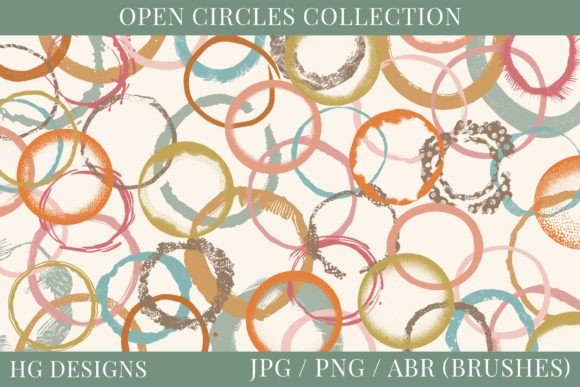
In the world of digital design, perfection can often feel sterile. Clean lines and flawless gradients have their place, but there is a growing demand for assets that carry weight, history, and character. This is where Open Circles Photoshop Brushes step in as an essential tool for creatives who want to break away from the polished look. This collection features 60 distinct distressed and grungy circles, offering a versatile library for adding organic texture to your work. Whether you are designing for print or screen, these brushes provide the imperfect edges and weathered aesthetics that modern audiences find so appealing.
The true value of this set lies not just in the visual appeal of the shapes themselves, but in the flexibility of the file formats provided. You receive the 60 circles in transparent PNG format, high-quality JPG format, and native Photoshop .abr brush format. This triad of options ensures that whether you are a seasoned Photoshop expert or someone working in simpler graphic design software, you have immediate access to the tools you need without complex conversion steps.
Bridging the Gap Between Digital and Physical Crafts
One of the most exciting developments in recent years is the convergence of digital design and traditional crafting. The rise of sublimation printing has allowed hobbyists and small business owners to transfer digital artwork onto mugs, t-shirts, tote bags, and metal sheets. However, standard digital clipart often looks flat and out of place on physical objects. Using Open Circles Photoshop Brushes allows creators to add a layer of grit and realism that mimics hand-stamped or aged materials.
For those involved in digital scrapbooking, these distressed circles serve as perfect framing elements. Instead of using rigid, geometric borders, you can layer these grungy rings around photos to create a sense of depth and nostalgia. The transparency of the PNG files is particularly crucial here, allowing the background paper textures to show through the "holes" in the circles, creating a cohesive and layered look that feels authentic rather than digitally pasted.
Practical Applications for Small Business Branding
Small business owners, particularly those in the handmade goods sector, constantly seek ways to make their packaging stand out. Labels and stickers are often the first point of physical contact between a brand and a customer. A clean, minimalist label works for tech products, but for artisanal soaps, candles, or baked goods, a rustic aesthetic often resonates more deeply with the target demographic.
By incorporating these open circles into label designs, you can create focal points that draw the eye to product names or key ingredients. The distressed nature of the brushes suggests authenticity and handcrafted quality. When used in conjunction with vintage typography, these circles help establish a brand identity that feels established and trustworthy. Because you have access to 60 different variations, you can maintain consistency across a product line while ensuring that each item has a unique visual fingerprint.
Enhancing Wall Art and Home Decor Projects
Instant wall art has become a popular niche for digital artists selling printable downloads on platforms like Etsy. Buyers in this space are often looking for pieces that complement specific interior design trends, such as industrial chic, farmhouse, or bohemian styles. These styles heavily rely on texture and imperfection. A stark white circle on a black background might look too modern, but a grungy, textured ring adds the necessary warmth and complexity.
When creating collage-style wall art, these brushes allow for rapid iteration. You can scale, rotate, and overlay multiple circles to build complex compositions. The .abr brush format is particularly powerful here, as it allows you to paint directly onto your canvas, adjusting opacity and flow to achieve subtle blending effects that static images cannot replicate. This level of control enables artists to create one-of-a-kind pieces that feel curated and intentional.
Junk Journaling and Decoupage Inspiration
The junk journaling community thrives on the aesthetic of found objects and layered memories. While many journalers work with physical ephemera, an increasing number are hybridizing their process by printing digital elements to cut and paste. The Open Circles Photoshop Brushes are ideal for this purpose. They can be printed on various types of paper, from standard cardstock to delicate rice paper, and then torn or distressed further by hand before being adhered to journal pages.
In decoupage projects, these circles can serve as backgrounds for other elements or as standalone decorative motifs. The variety in the set means you can choose circles with heavier distressing for bold statements or lighter, more subtle rings for background texture. This versatility ensures that the asset remains useful across a wide range of creative projects, preventing the fatigue that often comes with using limited clipart packs.
Technical Considerations and Best Practices
Before diving into your next project, it is helpful to understand how to get the most out of these files. If you are using the Photoshop .abr brushes, remember that brush dynamics can significantly alter the output. Experimenting with pressure sensitivity if you have a graphics tablet can add even more organic variation to the strokes. For users working in other software, the transparent PNGs are your best friend. Ensure that your workspace supports layers and transparency to avoid unwanted white boxes around your circles.
It is also important to consider resolution. While these brushes are designed for versatility, always check the DPI settings of your document. For print projects like sublimation or wall art, a higher resolution (300 DPI) is standard to ensure crisp edges, even when those edges are intentionally distressed. For web-based uses like social media graphics or digital stickers, 72 DPI is usually sufficient and helps keep file sizes manageable.
Why Distressed Textures Matter in Modern Design
We live in a saturated digital environment. Consumers are bombarded with sleek, high-definition imagery daily. As a result, there is a psychological pull toward designs that feel human and tactile. Distressed textures trigger a sense of familiarity and comfort. They remind us of worn leather, old paper, and faded paint. By integrating Open Circles Photoshop Brushes into your workflow, you are tapping into this emotional response.
Furthermore, using pre-made distressed elements saves significant time. Creating realistic grunge effects from scratch requires advanced masking techniques, custom brush creation, and a keen eye for detail. Having a library of 60 ready-to-use circles allows you to focus on composition and messaging rather than getting bogged down in technical execution. This efficiency is invaluable for freelancers working under tight deadlines or hobbyists who want to spend more time creating and less time troubleshooting.
Ultimately, this set is more than just a collection of shapes; it is a toolkit for adding soul to your designs. Whether you are labeling a jar of homemade jam, designing a digital planner sticker, or composing a large-scale art print, these circles provide the foundational texture needed to elevate your work from good to memorable. The combination of usability, variety, and aesthetic appeal makes them a worthwhile addition to any creative resource library.