Mastering Metallic Details with Basic Magic Chain Brushes for Procreate
Digital illustration has evolved rapidly, yet certain textures remain notoriously difficult to replicate convincingly on a screen. Among these, metallic chains and jewelry stand out as a common stumbling block for artists. Drawing interlocking links that maintain consistent perspective, lighting, and weight requires a level of precision that can slow down even the most experienced illustrator. This is where specialized tools like Basic Magic Chain Brushes transform the workflow, turning a tedious technical challenge into a fluid, creative process.
For iPad users working within the Procreate ecosystem, this specific set of thirty brushes offers a robust solution. It is not merely about stamping pre-made shapes onto a canvas; it is about integrating dynamic, responsive tools that react to your hand movements while maintaining the structural integrity of complex metalwork. Whether you are designing fashion illustrations, creating concept art for fantasy characters, or adding intricate details to product mockups, understanding how to leverage these brushes can significantly elevate the quality and speed of your output.
The Mechanics of Realistic Chain Rendering
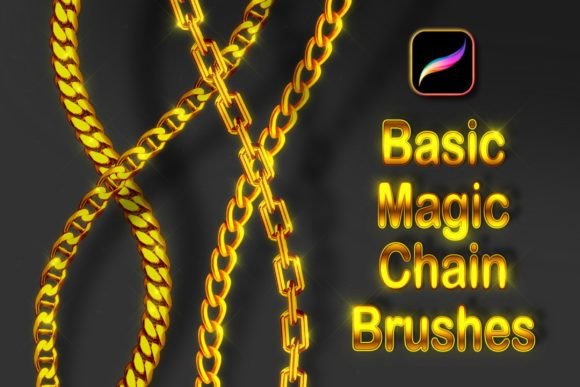
The primary appeal of the Basic Magic Chain Brushes lies in their ability to simulate physical properties digitally. Traditional brush strokes often fail when attempting to draw curved lines because the individual links distort or stretch unnaturally. However, this collection is engineered to provide opaque, realistic, and smooth movement, even when navigating tight curves or complex angles. This ensures that the chain maintains its volume and form, regardless of the path you draw.
A critical feature of these tools is their compatibility with the Gradient Map function in Procreate. Metal is defined by its reflections and color shifts. A gold chain is not simply yellow; it contains highlights of white, shadows of deep orange, and ambient reflections from its surroundings. By making the brushes color-changeable via Gradient Map, artists can instantly shift the material appearance from silver to gold, copper, or even fantastical metals like rose gold or oxidized bronze without redrawing a single stroke. This flexibility is invaluable for clients who may request material changes late in the design process.
Understanding the Brush Set Composition
The package includes a total of thirty distinct tools, carefully categorized to cover a wide range of stylistic needs. The core of the collection consists of 28 various basic chain brushes. These vary in link size, thickness, and style, ranging from delicate, fine jewelry chains to heavier, industrial-grade cables. This variety allows artists to match the brush to the scale of their illustration accurately. A heavy biker jacket requires a different chain weight than a subtle pendant necklace, and having twenty-eight options ensures you rarely have to compromise on visual accuracy.
In addition to the standard links, the set includes 2 sparkling glitter brushes. These are essential for adding that final touch of realism or glamour. Jewelry rarely exists in a vacuum; it catches light. These glitter brushes allow you to paint in specular highlights and sparkles that suggest a polished, high-quality finish. They can be used subtly to mimic ambient light reflection or aggressively to create a stylized, magical effect, depending on the artistic direction.
Optimizing Your Workflow for Best Results
To truly harness the power of these tools, one must understand the technical setup required within Procreate. Unlike standard round brushes that work immediately upon selection, magic chain brushes rely on dual-color dynamics to create depth and dimension. Therefore, it is mandatory to set both the Primary Color and Secondary Color before use. The primary color typically defines the base metal tone, while the secondary color often controls the shadow or highlight intensity, creating the illusion of three-dimensionality as you stroke.
Furthermore, for the most natural and proportional results, you should always turn Dynamic Brush Scaling on. This setting ensures that the size of the chain links adjusts relative to the pressure or speed of your stroke, preventing unnatural uniformity. Without this feature enabled, the chains may appear flat or inconsistent, breaking the illusion of reality. Taking a moment to verify these settings before beginning a piece can save hours of corrective editing later.
Installation and Compatibility Constraints
It is crucial to note that these brushes are compatible ONLY with the Procreate application for Apple iPad. They will not function with Adobe Photoshop, Clip Studio Paint, or any other graphic editing software. This limitation is due to the specific brush engine architecture unique to Procreate on iOS. Artists working in multi-software pipelines need to be aware of this boundary and plan their asset creation accordingly.
The installation process is straightforward but requires attention to detail. Users must download the provided .zip file. On an iPad, you should navigate to the Files app, locate the downloaded archive, and preview its content. Inside, you will find the specific brush file. Tapping on this file triggers the import mechanism, automatically adding the entire set to your Procreate brush library. If the brushes do not appear immediately, restarting the app usually resolves any minor syncing delays.
Practical Applications in Modern Design
The utility of Basic Magic Chain Brushes extends beyond simple jewelry design. In the realm of fashion illustration, these tools allow designers to quickly visualize accessories on croquis sketches, providing clients with a clearer idea of how hardware interacts with fabric. The smooth curvature capability means that chains can drape naturally over shoulders or wrap around wrists without manual adjustment of each link.
For concept artists in gaming and film, these brushes are indispensable for character design. Armor details, weapon embellishments, and cybernetic enhancements often feature intricate cabling and chainmail. Using a custom brush set reduces the time spent on repetitive detailing, allowing the artist to focus more on composition and storytelling. The ability to switch colors via Gradient Map also aids in rapid prototyping, enabling artists to test different material finishes—such as rusted iron versus polished steel—in seconds.
Even in graphic design and branding, where vector tools are often preferred, the organic feel of a hand-drawn chain can add a unique, artisanal touch to logos or packaging designs. The opaque nature of the brushes ensures that they stand out clearly against various backgrounds, making them versatile for both digital and print media preparations.
Learning Resources and Support
Recognizing that new tools come with a learning curve, the package includes comprehensive educational support. You will receive a quick tutorial in PDF file format, which outlines the basic settings and best practices. For visual learners, there is also access to a video tutorial on the creator’s YouTube channel. Watching the brushes in action provides insight into pressure sensitivity nuances and stroke techniques that text alone cannot convey. Engaging with these resources is highly recommended to maximize the value of the purchase.
Ultimately, the decision to invest in specialized brushes like these comes down to efficiency and quality. While it is possible to draw every link of a chain manually, the time cost is prohibitive for professional workflows. Basic Magic Chain Brushes offer a middle ground: the control of hand-drawing with the speed of automation. By integrating these tools into your Procreate toolkit, you open up new possibilities for texture and detail, allowing your artistic vision to shine without being bogged down by technical repetition.