Spiderweb Stamps Brushes for Procreate: A Practical Guide for Digital Halloween Art
Creating atmospheric digital illustrations often requires a balance between technical skill and efficient workflow. For artists working within the iPad ecosystem, Spiderweb Stamps Brushes for Procreate offers a specialized solution for adding intricate, spooky details without the tedium of manual drawing. This resource is particularly relevant during the Halloween season, but its utility extends to any project requiring gothic, eerie, or delicate web-like textures. Understanding what this toolset includes, how it functions, and where it fits within your broader digital art toolkit is essential for making an informed decision about its value.
Understanding the Composition of the Brush Set
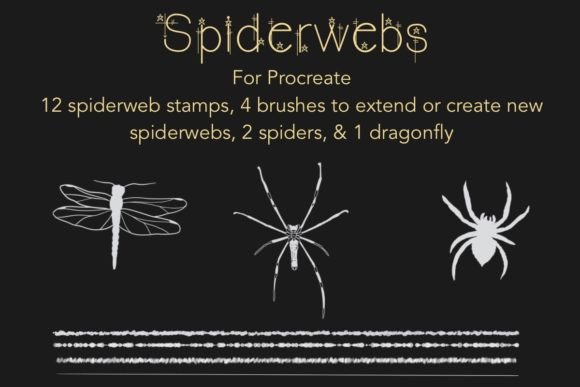
The core appeal of this specific brush set lies in its curated variety. Rather than offering a single generic web stamp, the package includes 12 spiderweb stamps divided into three distinct categories: dewy, frosted, and plain. This categorization is not merely aesthetic; it serves functional purposes in digital composition. The "plain" webs provide a clean, high-contrast outline suitable for graphic design elements or bold illustrations. The "frosted" variant introduces a subtle texture that mimics light diffusion, ideal for background layers or atmospheric depth. The "dewy" stamps add specular highlights, simulating moisture or morning mist, which can significantly enhance the realism of outdoor scenes.
Beyond the stamps themselves, the set includes 4 specialized brushes designed for customization. These tools allow artists to extend existing webs, link separate elements together, or combine different stamps seamlessly. This feature addresses a common limitation of static stamp brushes: rigidity. By providing the means to draw your own connections, the set encourages a hybrid workflow where pre-made assets are integrated with hand-drawn elements. Additionally, the inclusion of 2 spiders, a dragonfly, and a text document with tips and tricks rounds out the package, offering immediate assets for scene-building and guidance for optimal usage.
Comparing Stamp Brushes to Manual Drawing Techniques
When evaluating Spiderweb Stamps Brushes for Procreate, it is helpful to compare them against the alternative of drawing webs manually. Manual drawing offers ultimate control over perspective, tension, and irregularity. An experienced artist can tailor every strand to fit the specific lighting and angle of their composition. However, this approach is time-consuming. Drawing realistic, symmetrical, or complex webs requires a steady hand and a significant investment of hours, which may not be feasible for commercial deadlines or rapid content creation.
Stamp brushes, by contrast, prioritize efficiency and consistency. They provide instantly recognizable shapes that can be scaled, rotated, and opacity-adjusted within seconds. The tradeoff is a potential loss of organic uniqueness if used repetitively without modification. This is where the included extension brushes become critical. They bridge the gap between the speed of stamping and the customizability of manual drawing. For artists who need to populate a scene with multiple webs—such as a haunted house interior or an abandoned forest—this hybrid approach saves considerable time while maintaining visual interest.
Evaluating Fit: When This Tool Is the Right Choice
This brush set is best suited for illustrators, graphic designers, and hobbyists who frequently incorporate horror, fantasy, or seasonal themes into their work. If you are creating Halloween-themed social media graphics, book covers, or greeting cards, the ready-made nature of these stamps allows for rapid iteration. The "dewy" and "frosted" variants are particularly useful for artists focusing on mood and atmosphere, as they reduce the need for complex layer blending modes to achieve texture.
Furthermore, the set is valuable for educators or beginners learning digital composition. The included text document with tips and tricks provides foundational knowledge on how to integrate stamps without making them look pasted-on. For those new to Procreate, understanding how to use transform tools, adjust opacity, and utilize clipping masks with these stamps can accelerate the learning curve for digital collage techniques.
Limitations and Considerations for Alternative Options
While versatile, Spiderweb Stamps Brushes for Procreate has limitations. It is a niche tool. If your primary focus is portraiture, landscape painting, or abstract art, these brushes will see limited use. Additionally, artists who prefer a highly stylized, non-realistic approach may find the pre-defined shapes too structured. In such cases, custom brush creation or manual sketching might yield more aligned results.
Another consideration is resolution and scalability. While Procreate handles vector-like scaling well for stamps, extremely large enlargements may reveal pixelation depending on the original brush settings. Users should test the stamps at their maximum intended size before committing to a final piece. If you require infinite scalability for print media at massive dimensions, creating your own vector-based webs in software like Adobe Illustrator might be a more robust, albeit more complex, alternative.
Practical Applications and Creative Workflow
To maximize the value of this set, consider integrating the stamps into a layered workflow. Start with the "plain" stamps to establish the structural layout of the webs in your composition. Use the extension brushes to connect these structures to corners, branches, or characters, ensuring the webs feel anchored in the environment. Next, overlay the "frosted" or "dewy" stamps on separate layers with reduced opacity to add texture and depth. This layering technique prevents the image from looking flat and allows for independent adjustment of color and brightness for each texture type.
The included spiders and dragonfly can serve as focal points or narrative elements. Placing a spider near the center of a web draws the viewer’s eye, while a dragonfly caught in a strand can add a sense of movement and tragedy to the scene. These small details transform a static background element into a storytelling device. Experimenting with blend modes such as "Multiply" for shadows or "Screen" for highlights can further integrate these elements into the underlying artwork.
Making an Informed Decision
Choosing whether to invest in Spiderweb Stamps Brushes for Procreate depends on your specific artistic needs and workflow preferences. If you value time efficiency and frequently create content requiring spooky or intricate web designs, this set offers a compelling balance of convenience and flexibility. The inclusion of multiple texture variants and customization tools distinguishes it from basic stamp packs that offer only static images.
However, if you prioritize complete artistic control and have the time to dedicate to manual detailing, you may find greater satisfaction in developing your own brush library or drawing elements from scratch. For most digital artists, though, having a reliable set of high-quality stamps serves as an excellent safety net, allowing you to focus creative energy on composition and character rather than repetitive textural details. Ultimately, this tool is a practical addition to a well-rounded digital art arsenal, particularly for those who embrace the seasonal spirit of Halloween and the gothic aesthetic year-round.